Goal
Finding out the hold pan card applications from ETDS Website collecting details and updating in an excel sheet,then find out the customer details from the same excel sheet , find phone number of the particular retailer and inform them about the hold applicaiton to the Retailer via WhatsApp
Overview:I am an authorized NSDL Pan card Distributor.You can understand about my nature of business by checking our previous chat.
My Current Requirement
My retailers are applying pan card on daily basis in my portal.We are uploading those applications in NSDL Website through ETDS Website. Website Address “https://www.ieiletds.com/ETDS/”. due to some mistakes some applictions will get hold.The job of Our bot is Check ETDS Website daily and find out latest hold applications , update in the excel sheet, find out the Acknowledgement number and applicant name in my portal,paste those details in the sheet and find out the Retailers mobile number in the same sheet.inform the retailer via Whatsapp web which is opened.
Step 1
Login to ETDS WEBSITE . Login link : https://www.ieiletds.com/ETDS/
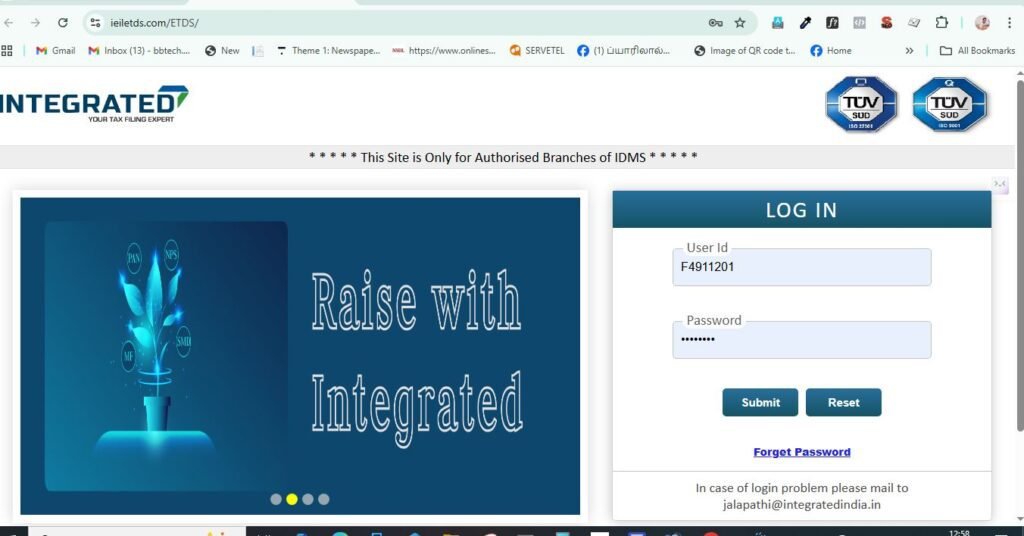
The Bot should login into the site. After login the dashboard looks like as below

After login Need to click on PAN INFO-Pan Rejections. or visit the Direct rejection link :https://www.ieiletds.com/ETDS/PAN/PAN_Rejection_Report.aspx
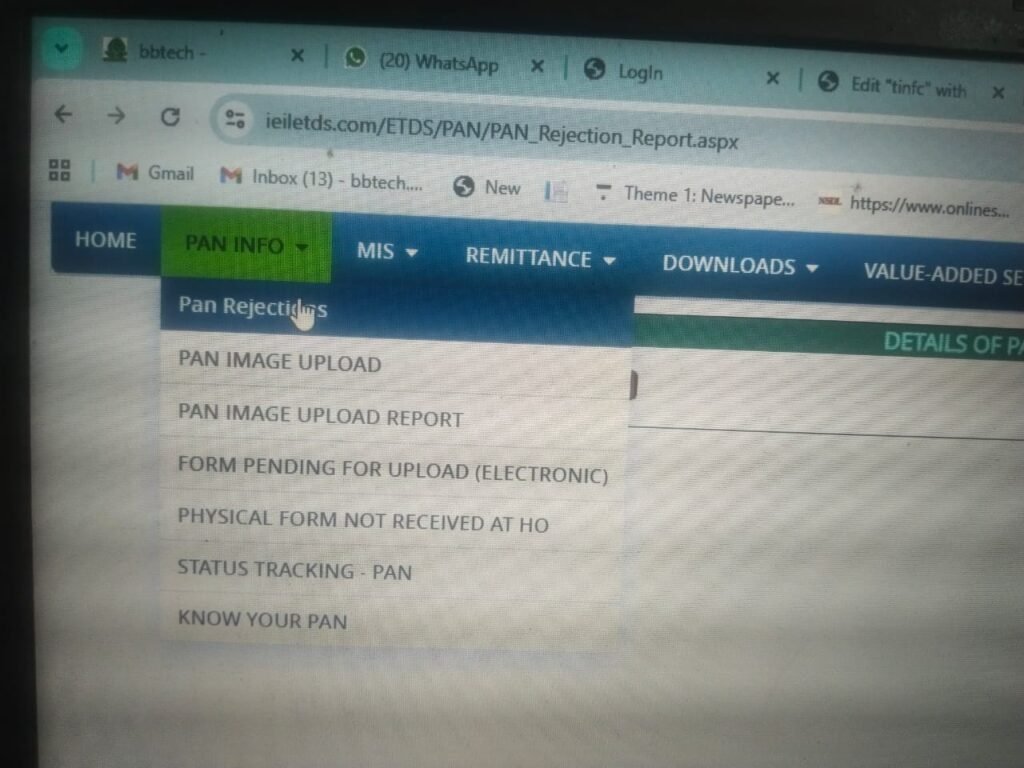
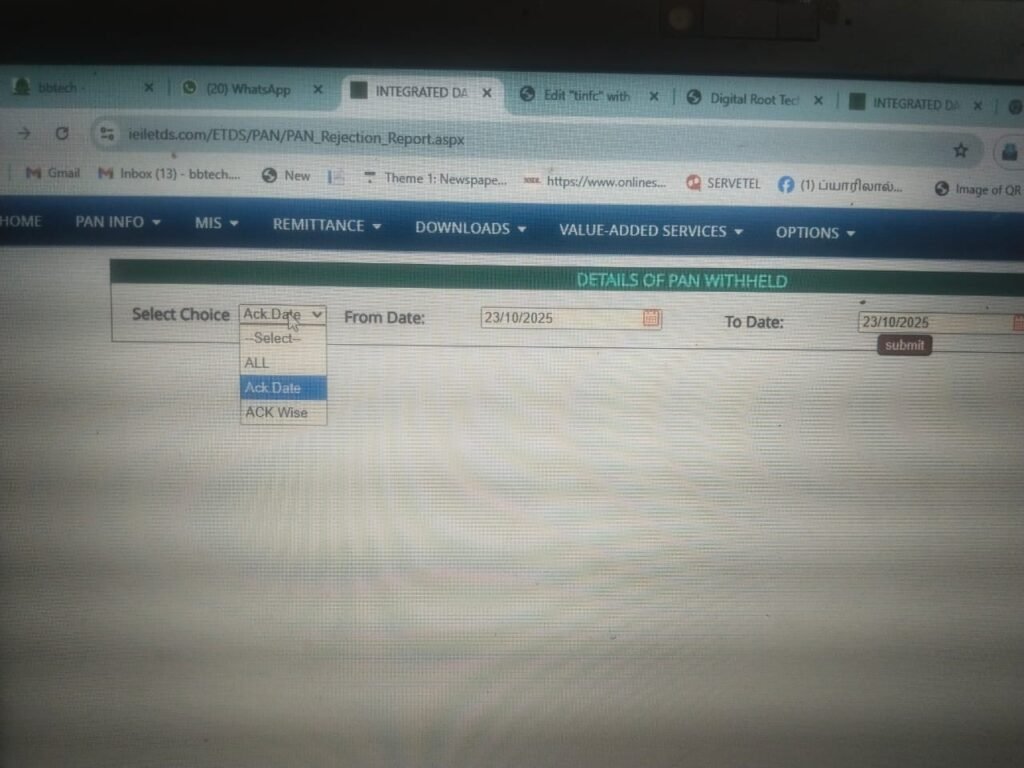
After clicking Visit https://www.ieiletds.com/ETDS/PAN/PAN_Rejection_Report.aspx , it will take you below page. here bot need to select the button “Select Choice”- and select -Ack Date.Both from and to date will show the current date by default.Bot need to change the From date as 10 days before date.dont touch the To date. Example today is October 23.When bot click Select Coice then Ack Date, By default both From and To date will show the current date as 23/10/2025 by default. The bot should change the From date as 13/10/2025/.Then click on submit button below the To date.
When you click on submit the below details will show .First you see the seriel number then Ack No (15 digit) then Ack Date, Then Reason for With Held.The bot need to collect the Ack No, Ack Date,and Reason For with Held comments from here and paste those details in an excel sheet i provide.See the image of the excel sheet below
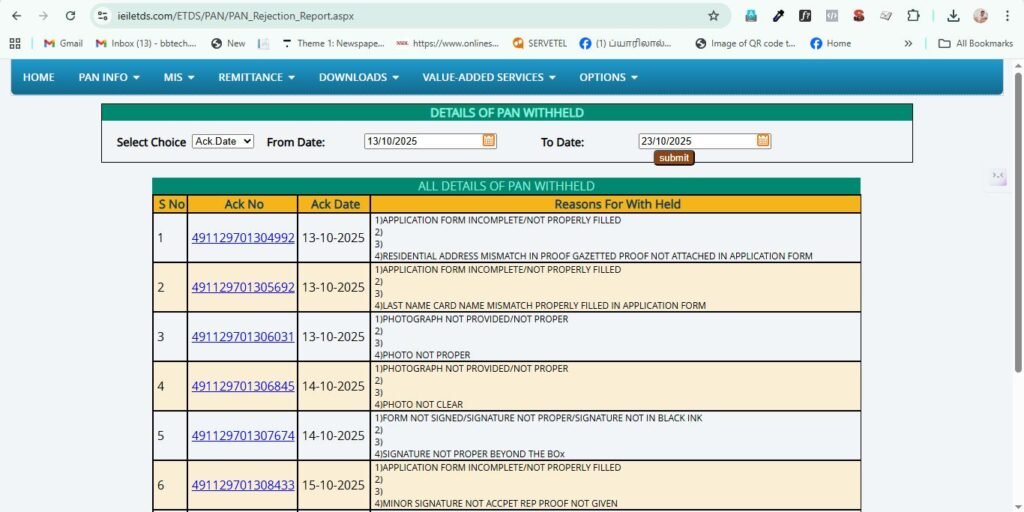

In the above excel sheet you can see two headings.1TIN REJECTION. 2. AGENT PORTAL. Under the tin rejection you have to paste the collected details from etds website.You need to be very careful when pasting the REASON. In ETDS WEBSITE UNDER “Reasons For With Held” There should be 4 serial numbers for reject reasons like below. below is example only the reason may vary for different ack numbers.In some Ack numbers there will be reason available in 1 and 4. for some ack numbers reason will be availabe in 1 only.In most of the cases 2 and 3 would be always empty.If the reason available in both 1 and 4 like below.bot should always collect the 4th reason and paste it in the sheet. Suppose if the reason available in the 1st serial number only then the first one should be pasted in the sheet.
1)APPLICATION FORM INCOMPLETE/NOT PROPERLY FILLED
2)
3)
4)MINOR SIGNATURE NOT ACCEPT AND REP PROOF REQUIRED
NEXT STEP
after finished the TIN REJECTION details in the wxcel sheet, then you need to fill Agent Portal details in the xcel sheet. It asking APPLICANT NAME, BATCH NUMBER AND MOBILE NUMBER.
To find those details the bot need to open my website https://ssquickseva.com/fullhome3/login and login with the user name and password .(i will provide ). when you login to SS QUICK SEVA PORTAL YOU NEED TO AWARE THAT THAT PORTAL CONTAIN GOOOGLE ADS. IT OFTEN INTERRUPT OUR WORKING.If you haVE ANY solution to prevent google ads interruption you can inform me, now Our main job is to collect the APPLICATN NAME AND BATCH NUMBER FROM THE SS QUICKSEVA DASHBOARD.
How to FInd the Applicant Name and Batch Number
To find the applicant name and batch number the bot need to copy the Ack number frm the sheet first. The ack number may be New pan or correction pan. So first bot need to open the new application list. the new all application list url is https://ssquickseva.com/portal/c/nsdl_newapplied.php Correction application list url is https://ssquickseva.com/portal/c/nsdl_csfapplied.php . The bot first open the New application list url and check whether it is new pan application . see the new application list screenshor below. In the center you can see a box(placeholder:NSDL ACK No) named Ack no. You need to paste the 15 digit collected ack number from the excel sheet and click Ack No Button.
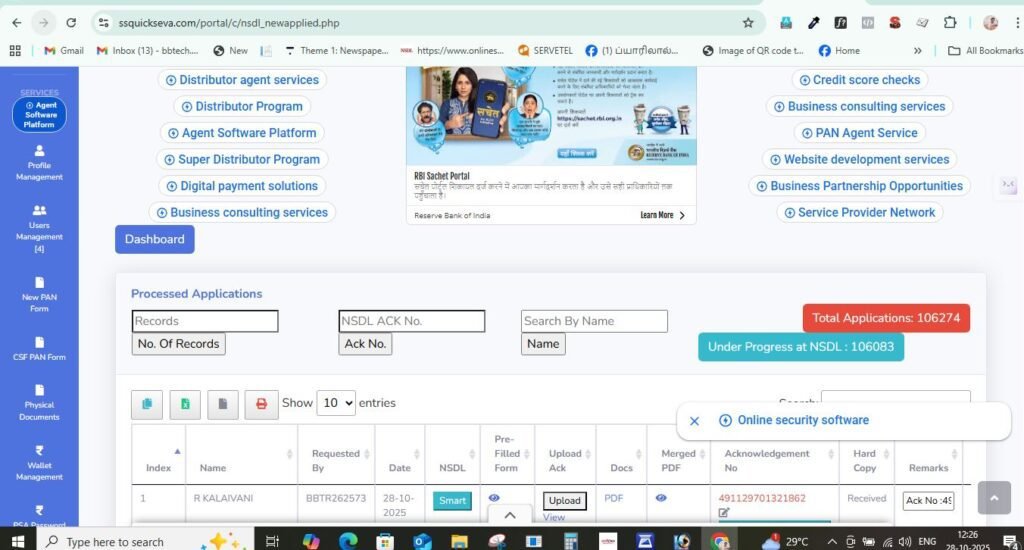
FOR EXAMPLE I AM GOING TO ENTER THE BELOW ACK NUMBER AND CLICK ON Ack No button.Actually the ack number belongs to new application. so it will show details like below.Here you can see the Applicant name under Name column, also you can see the batch number under Requested By column.from here you can copy the applicant namr and batch number and need to paste those details in the excel sheet.You have to make sure that the 15 digit ack number you used for searching and the Acknowledgement No. details are matching.both ack no should be exactly same.

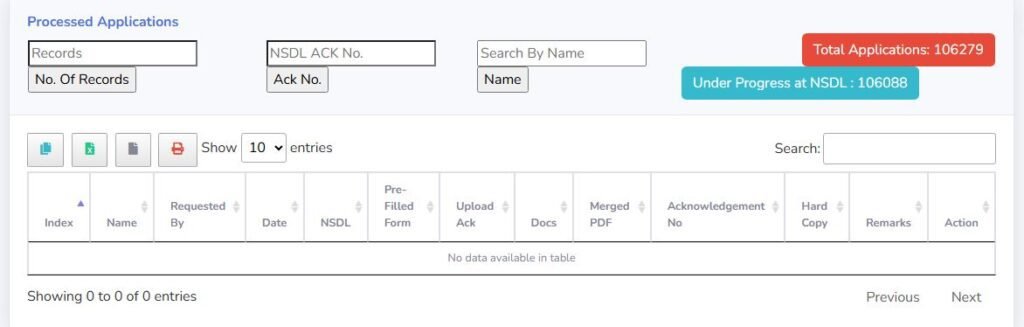
Suppose if the ack number is not belongs to new applications you can see the result like below. you can see the messege like below “No data available in table”. Suppose if the bot see the below error while trying in new application, then the bot needs to open correction url which i gave u and paste the ack number there. it must be there in correction list. Now bot got the APPLICANT NAME AND BATCH NUMBER FROM THE SS QUICK SEVA DASHBOARD.. nEXT STEP NEED TP FIND THE MOBILE NUMBER OF THE RETAILER.
How to find the Mobile number of the Retailer
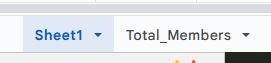
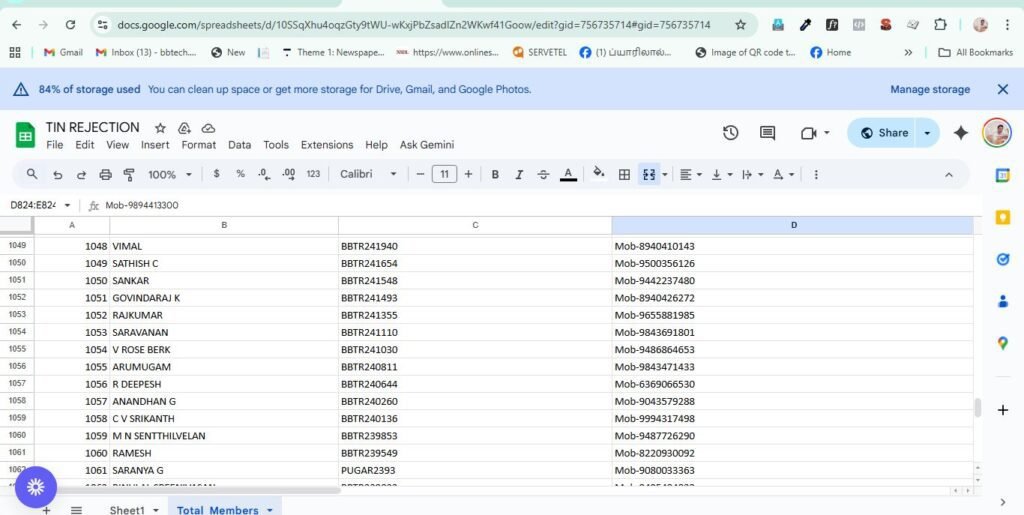
In the same sheet you can see sheet 1 and total_members. you need to click the total members – it will show all customer details like below. to find the Mobile number of the retailer the bot need to copy the batch number of the retailer from the excel shee and search here. example if the batch number is BBTR5331, the bot can search the batch number in the excel sheet and find the mobile number of the customer like in the 3rd image. and paste the Mobile number in the main excel sheet. thus you can get all details to fill the excel sheet.Now i have added a new field in the excel sheet named Type. in the Type field, if the application belongs to new , you need toy enter N, if the application belongs to CORRECTION YOU NEED TO TYPE C.
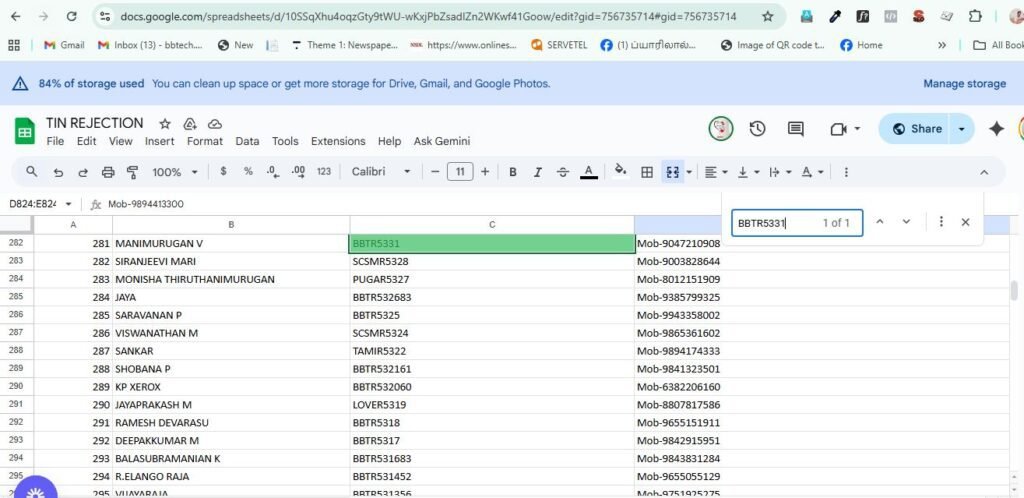
Important: if bot find the same ack number already available in the sheet while collecting details in etds site then no need to duplicate again. The next big step is informig the rejection to my retailers.
How to inform rejections to retailers
in the main excel sheet under Agent PORTAL HEADING, THE BOT PASTED THE MOBILE NUMBER OF THE RETAILER.The bot copy the mobile number and go to the WhatsApp web (I already opened in a tab) and paste the copied number from excel and inform about the rejection. The rejection messege example Template.
Your PAN application (21-10-2025) is on hold.
Applicant: MANISHA V
Ack No: 491129701304340
Reason: Minor’s signature not accepted & representative proof required.
👉 To fix this, visit https://support.bbtechpan.com/auth
🔹 If you already have an account, log in and create a new ticket.
🔹 If you don’t have an account, register first and after approval, create the ticket.
📱 Support (WhatsApp only): 6382778910
— BBTECH Support Team.
You will get all the details Applicant name, Ack number, reason frm the google sheet.
Final step
After every day work finished. Bot need to inform me the details. Hai Shiju , Tin rejection bot is here. Today new rejections: (put the rejection number). informed to retailers vis Whats app(put the total informed). Thanks you. My mobile number to send the above details to me is 9943168284