

Application form checking concept.
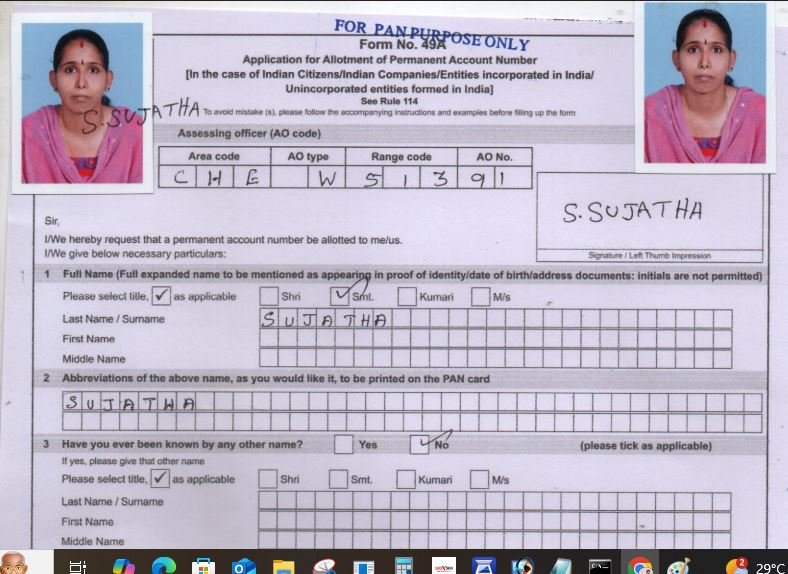
Before checking the form. The bot first need to check the aadhaar and understand the Name format. I already teach you about Single Name format. We call it as Rule No:1 Single Name. you know the logic very well. after validating aadhaar details. now you have to check the form. The form contains three pages. 1st page No.1 to 7, 2nd page: No:8 to 16 then aadhaar of the applicant.now see the small part screenshot below. Two photos of he appliant should be pasted s like in the below image.Sign should be done in left side across the photo as like in the image. you can see an AO code section. Assessing officer (AO code). it should be written like below. Bot dont need to validate the AO code just check whether it is written or not. Then Check the Signature box below the right side photo. the applicant should sign inside of the box. the sign should not touch borders of the box.becaus this is the sign which show in the real pan card. We need to crop the sign.
Now see Column No:1 title should be selected Shri for Males, Smt for married women. Kumari for unmariied women. then see the name fields. though it is a Single Name Rule No:1 , the name should be written in last name field only. 2. Abbreviations of the name (This field is called as Card Nam) . For Rule No:1 (Single Name) card name should be the same name.You cant write SUJATHA S OR SOME OTHER NAMES HERE. for single name card name should be the exact applicatn name as it is.No see the 3rd column, starting with Have you ever been… Here No should be checked always.
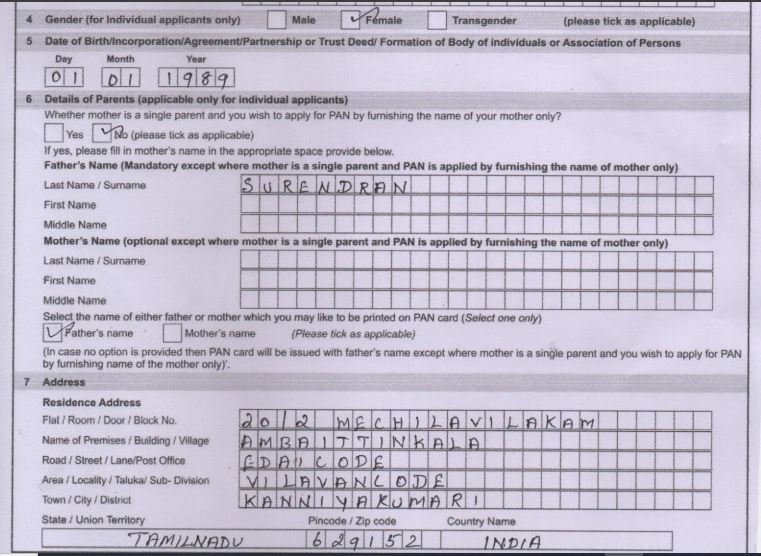
Now understand the column from 4 to 7
4th column is gender. it should be selected according to the gender in aadhaar. then 5th column. in 4th column date of birth should be filled as per aadhaar. DD:MM:YEAR format. now see 6th column. here you carefully understand. Applicant can write their father name or mother name as per their wish. if father name You can see there is a field to write father name and mother name in 6th column.If only father name is written, then retailer has to tick No and also tick Father name.If the applicatn wants mother name should be filled. then the retailer Should tick Yes and tick Mother Name. but they can write Both father name and mother name in the field or Mother name only in the field. but if tick Yes then writing mother name is mandatory.then see 7th column.in 7th column address should be filled. Bot dont need to validate the address with aadhaar. also Fathe name and mother name validation is also not needed. they can write the name as per their wish
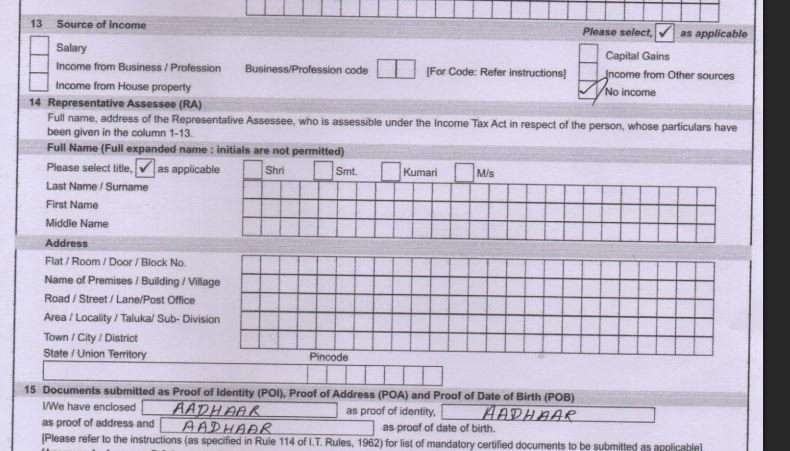
now see the below image. office address is the continuoution of 7th column. no need to fill that. Then see 8th column. there residence should be ticked as shown in the image.see 9th column. here country code, mobile number and email id should be filled. country code can be 91 or +91 anyone is ok. see 10th column. here individual should be ticked. see 11th column. nothing should be filled here.see 12th column. it is very important column. here aadhar number should be filled in the first box. the field name pls mension your AADHAAR number. then u need to fill name as per aadhaar. here you need to fill the applicant name exactly as it is in aadhaar.you need to validate this field with the aadhaar.

now we see the column from 13 th to 15 . in 13th column No income should be ticked as shown in the image. 14th column. dont need to fill if the applicnt is major. This should be filled only if the applicant is minor. i will teach you the logic later parts. now see 15th column. in the all three boxes should be filled as AADHAAR, AADHAAR, AADHAAR AS SHOWN IN THE IMAGE.
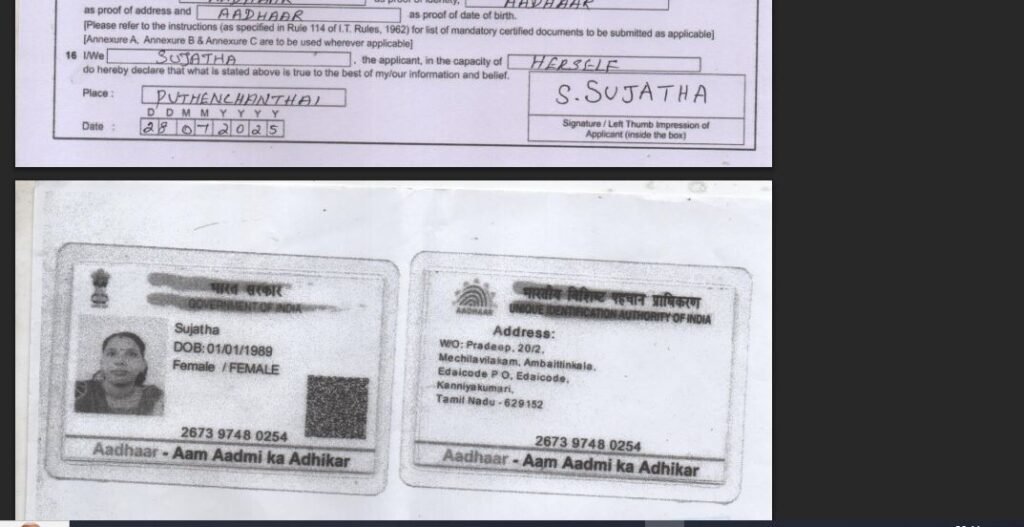
NOW SEE THE 15TH COLUMN AND AADHAR IMAGE.IN 16TH COLUMN IN THE PLACE OF I/WE APPLICANT NAME SHOULD BE FILLED. THEN NEXT COLUMN HIMSELF OR HERSELF SHOULD BE FILLED. THEN PLACE AND DATE SHOULD BE FILLED. THEN U SEE A SIGNATURE BOX THERE YOU SIGNTURE SHOULD BE THERE. HERE YOU DONT NEED TO CHECK THE SIGN TOUCHING BORDER LINE OR NOT. FINALLY U SEE AADHAAR
SSQUICKSEVA PORTAL INTRODUCTION
Below is the url of ssquickseva login
https://ssquickseva.com/fullhome3/login
there is no captcha to validate. so i want bot can login the website automatically. i will provide the user name and password.
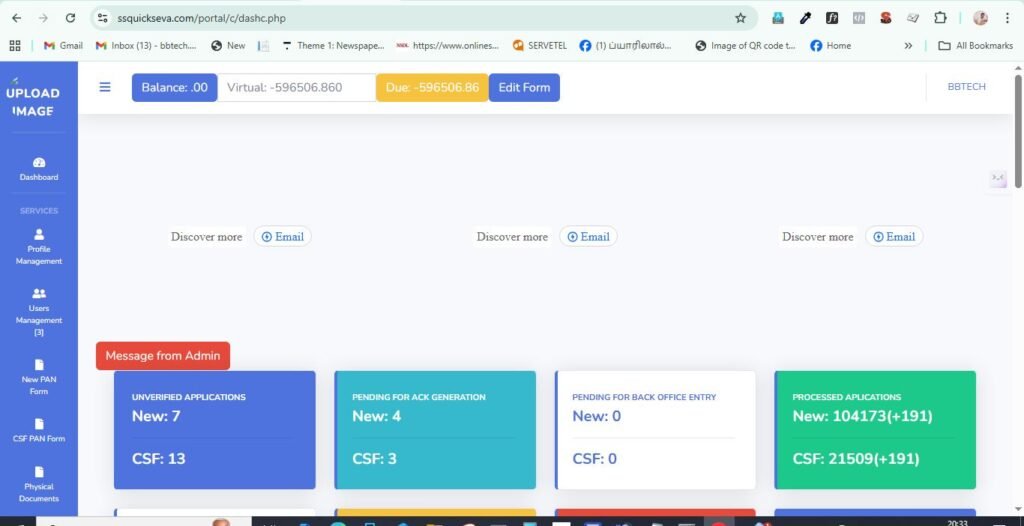
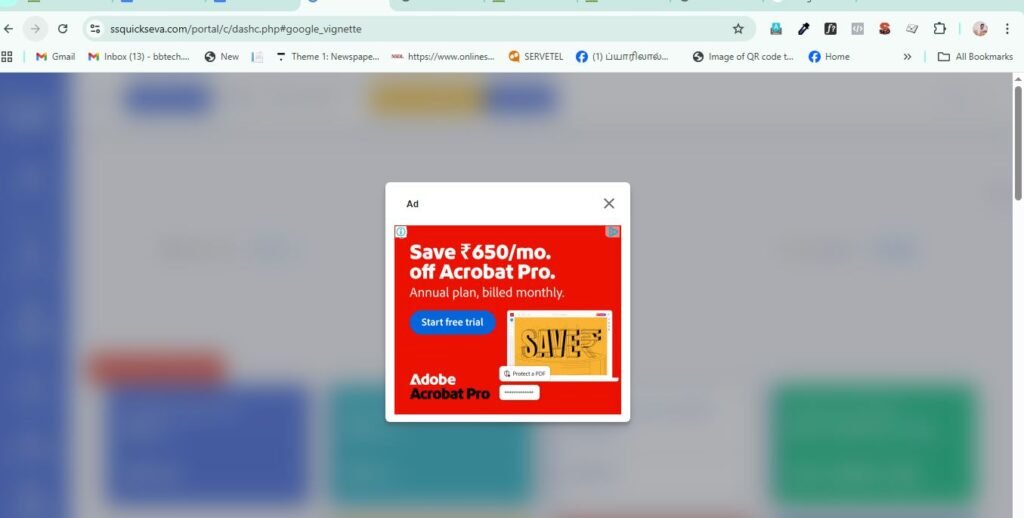
See below the dashboard after login.Here you see the unverified application New. bot need to click on it to show all unverified applications. Other important thing about this webiste is Google ads is enabled this website. so it often get slow and show google ads inbetweent the works. so you should design the bot accordingly.sometime it will load bit more time. so if the bot nofify the website still loading while clicking it must be wait with patience . Sometimes it load and show cloudfare page. in this suituation the bot need to refresh the page .below i show you the google ads interruption.if u can u block it if possible. adblock.

When you click on unverified applications the below page will open as u can see in the image. pagination is there. in a table 10 applicaitons are there. u see the name of the tables 1. Index, 2. Name,3.Mob.4.Requested by.5.Prefilled form, 6.Docs.,7.Temp Ack.9. verify. Here you must see the letter PDF under Docs then only the form is eligible to verify.if you see N/A under Docs then you dont click verify. it means customer did not upload pdf yet.The direct link of the unverified application is https://ssquickseva.com/portal/c/nsdl_newunverified.php.
When click on check the p[articular pan form will open like below. bot need to scrool down to see the full pdf. you can see two scrolling bards are there. first bar is used to scrol to view the pfd.

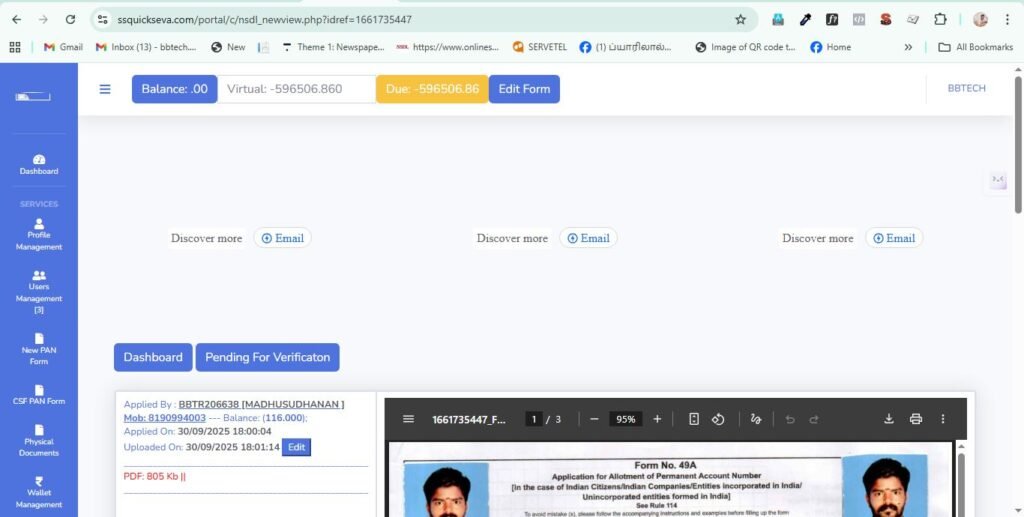
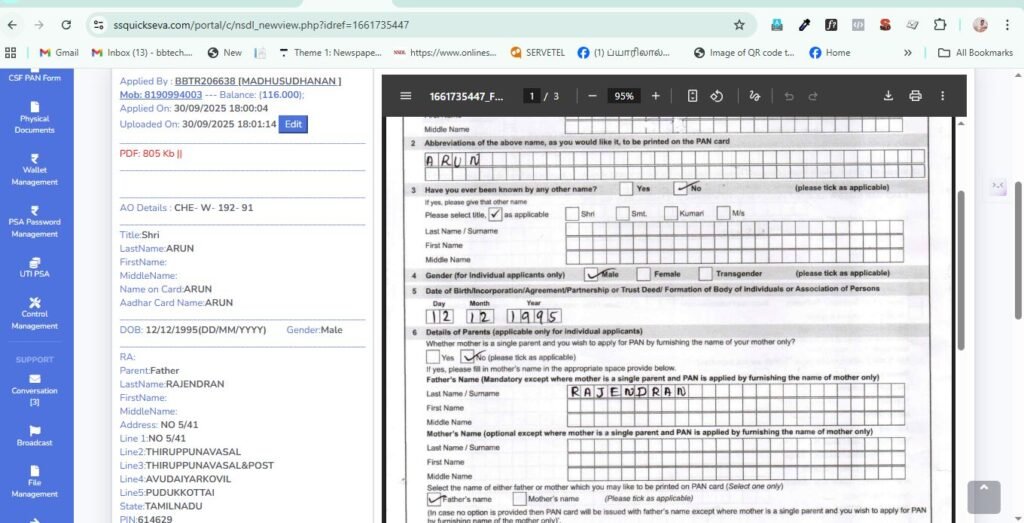
Now you see above image. The details showing in the left side is the online application details filled by retailer.Here is the place you match the details with the form.Whaat details you should match with the form and aadhaar. Applicant Name, Name on card.Father Name, date of birth. Aadhaar number and Aadhar Name. tese details must exactly should match with form .